
[Solved-4 Solutions] Xcode 6.1 error while building IPA
Error Description:
Xcode 6.1 error while building IPA
Solution 1:
- Solution for building IPA is:
- Found the fix !
- Click on our project > Targets > Select your target > Build Settings >
Code Signing Resource Rules Path
click below button to copy the code. By - ios tutorial - team
- and add :
$(SDKROOT)/ResourceRules.plist
click below button to copy the code. By - ios tutorial - team
Solution 2:
- The solution we found is to call
codesignbefore usedPackageApplicationand askPackageApplicationto not sign. Like this :
replace :

 /usr/bin/xcrun -sdk iphoneos PackageApplication -v "<app_path>" -o "<ipa_path>" --sign "<provisioning_profile.certificateSubject>" --embed "<provisioning_profile.path>"

by :

/bin/cp -rpfv "<provisioning_profile.path>" "<app_path>/embedded.mobileprovision"
/usr/bin/codesign -v -vvvv -f -s "<provisioning_profile.certificateSubject>" --entitlements="<entitlement_path>" "<app_path>"
/usr/bin/xcrun -sdk iphoneos PackageApplication -v "<app_path>" -o "<ipa_path>"
click below button to copy the code. By - ios tutorial - team
- Don't forget to embedded the
.mobileprovisionfile using to sign withcp.
Solution 3:
- The following patch for PackageApplications fixed it for us, we removed resource-rules as it says it's deprecated on 10.10.
- Testflight builds work without it. Appstore builds too.
/Applications/Xcode.app/Contents/Developer/Platforms/iPhoneOS.platform/Developer/usr/bin
 % diff PackageApplication PackageApplicationFixed
155,157c155,156
<     my @codesign_args = ("/usr/bin/codesign", "--force", "--preserve-metadata=identifier,entitlements,resource-rules",
<                          "--sign", $opt{sign},
<                          "--resource-rules=$destApp/ResourceRules.plist");
---
>     my @codesign_args = ("/usr/bin/codesign", "--force", "--preserve-metadata=identifier,entitlements",
>                          "--sign", $opt{sign});
click below button to copy the code. By - ios tutorial - team
Solution 4:
- The solution is to clear our Code Signing Resource Rules Path and replace xcrun with xcodebuild tool:
xcodebuild -exportArchive -archivePath [path to archive] -exportPath [path to output directory] -exportOptionsPlist [path to options.plist file]
click below button to copy the code. By - ios tutorial - team
- The simplest Options.plist for exporting ad-hoc distribution ipa files looks like this:
<?xml version="1.0" encoding="UTF-8"?>
<!DOCTYPE plist PUBLIC "-//Apple//DTD PLIST 1.0//EN" "http://www.apple.com/DTDs/PropertyList-1.0.dtd">
<plist version="1.0">
<dict>
    <key>iCloudContainerEnvironment</key>
    <string>Production</string>
    <key>teamID</key>
    <string>[YOUR TEAM ID]</string>
    <key>method</key>
    <string>ad-hoc</string>
</dict>
</plist>
click below button to copy the code. By - ios tutorial - team
- There are other options available for this plist file regarding bitcode, app thinning, etc.
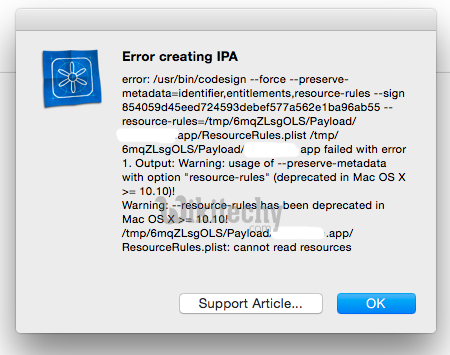
Learn ios - ios tutorial - iphone xcode 6-1 error - ios examples - ios programs