
java tutorial - Loops in Java - java programming - learn java - java basics - java for beginners
Loop - the statements are executed sequentially: the first statement of the function is executed first, then the second one, and so on. The loop is used in a situation where you need to execute a code block several times
Loops
- Loop declarations allow you to execute an operator or group of statements several times, the general structure of the loop statement in most programming languages is given below:
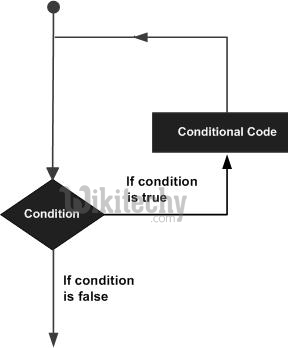
Learn java - java tutorial - loop scheme - java examples - java programs
- There are the following cycles in Java to handle cyclic requirements (go to the next links to learn more about each).
| Loop | Description |
| while | Repeats an operator or group of statements as long as the specified condition is true. The loop checks the condition before the loop body executes. |
| for | Executes the sequence of statements several times and shortens the code that the loop variable controls. |
| improved for | Executes a sequence of statements several times and shortens the code that the loop variable controls. |
| do ... while | The while loop is executed, except that it checks for conditions at the end of the loop body. |
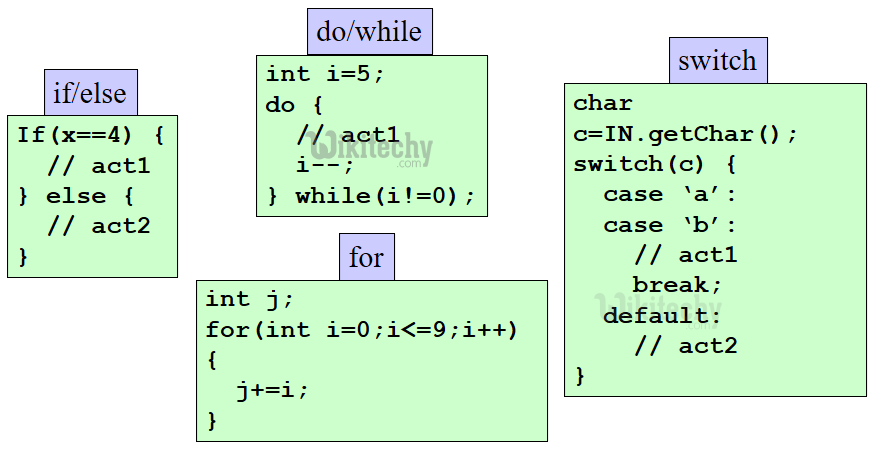
Cycle Operators
- Cycle statements - change the normal execution of the loop sequence in Java. When execution exits from its area, all objects that were created automatically in this area will be destroyed.
- Java supports the following control loop statements.
| Operator | Description |
| break | Terminates the loop or switch statement, and passes the execution to the next, which is immediately after the loop or switch statement. |
| continue | Causes the loop, skip the rest of its body and immediately recheck its state again. |