
html tutorial - <th> Table Header Tag in HTML - html5 - html code - html form
Learn html - html tutorial - tableheader th tag in html- html examples - html programs
- The <th> tag is used to specify a header cells in the table.
- There are the two kinds of cells in the table.
- Header cells, which specifies the header information using <th> tag.
- Standard cells, which specifies the data using <td> tag.
- The <th> tag supports Global Attributes and Event Attributes.
Syntax for <th> tag:
<th>content</th>Differences between HTML 4.01 and HTML 5 for <th> tag:
HTML 4.0.1
- abbr, align, axis, bgcolor, char, charoff, colspan, headers, height, nowrap, rowspan, scope, sorted, valign, width attributes are supported.
HTML 5
- All layout attributes are removed except colspan, headers, rowspan, scope and sorted.
Sample Coding for <th> tag:
Tryit<!DOCTYPE html>
<html >
    <body>
        <table border=1>
            <tr>
                <th>Firstname</th>
                <th>Lastname</th>
            </tr>
            <tr>
                <td>Wiki</td>
                <td>techy</td>
            </tr>
        </table>
    </body>
</html>
Code Explanation for <th> tag:
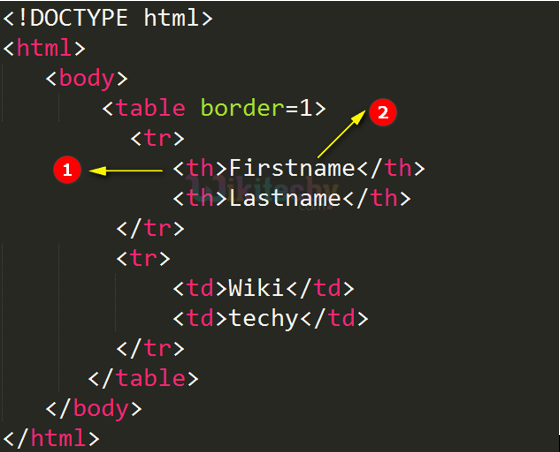
- <th> tag - is used to defined the content of the table’s header elements.
- Firstname is the data of the header table which is shown in dark letters.
Output for <th> tag:
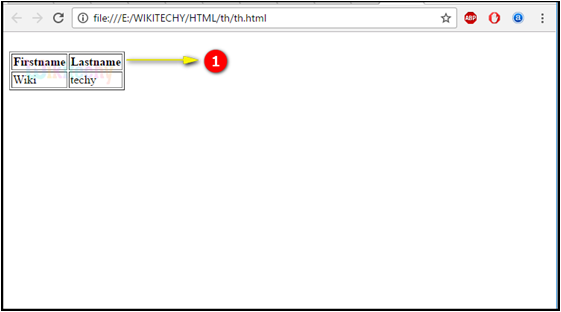
- Here we can see the output Firstname and lastname defines the table header.
Attributes of <th> tag:
| Attribute | Value | HTML 4 | HTML5 | Description |
|---|---|---|---|---|
| align | left right center justify char |
Yes | No | Provides the alignment of the content. |
| valign | top middle bottom baseline |
Yes | No | Describes the alignment of the content in vertical. |
| char | character | Yes | No | Defines the content alignment relevant to a character. |
| charoff | number | Yes | No | Provides the number of characters. |
| width | pixels % |
Yes | No | The width of a cell |
| scope | col colgroup row rowgroup |
Yes | No | To associate header cells and data cells in a table |
| abbr | text | Yes | No | Abbreviated version of the content in a cell |
| axis | category_name | Yes | No | Categorizes cells |
| bgcolor | rgb(x,x,x) #xxxxxx colorname |
Yes | No | The background color of a cell |
| headers | header_id | Yes | Yes | A cell is related to one or more header cells. |
| colspan | number | Yes | Yes | The number of columns a cell should span |
| height | pixels % |
Yes | No | The height of a cell |
| nowrap | nowrap | Yes | No | The content inside a cell should not wrap |
| rowspan | number | Yes | Yes | The number of rows a cell should span |
| sorted | reversed number reversed number number reversed |
Yes | Yes | The sort direction of a column |
Browser Support for <th> tag:
 |
 |
 |
 |
 |
|---|---|---|---|---|
| Yes | Yes | Yes | Yes | Yes |
Tips and Notes
- The colspan and rowspan attribute is used to let the content span over different columns or rows.